CPRG-306 Week 9
Firebase Auth
Agenda
- Context API
- React:
childrenprop, Custom Hooks - Authentication vs Authorization
- Next.js: Environment Variables
- Firebase: Auth
- Coding Demo
React Context
- A way to pass data through the component tree without having to pass props down manually at every level avoiding prop drilling
- A global state that can be accessed from any component (e.g. user info, language, theme)
- A context is an object that stores a value and can be accessed by any child component
- It's like a global variable that can be accessed from any sub-component
- It's like
propsbut without having to pass them down manually
React Context API
createContext: a function that creates a new contextContext.Provider: a component that passes the context to its childrenuseContext: a hook thatallows your to share state without passing down props
Context Naming Conventions
- PascalCase
- Pattern: TermContext
- ie:
AuthContext.js,ThemeContext.js
- ie:
- then store relevant custom hooks with their respective contexts
useContext vs useState
- useState manages local component state - it creates and controls a piece of state within a single component.
- useContext doesn't create state at all - it's a distribution mechanism that lets components access values from somewhere up the tree without prop drilling.
- useContext is great for things like: dark mode toggle, site layout toggles, authentication
- They are often used together
Use useState when:
- State is only needed in one component (or its immediate children via props)
- You want simplicity and explicit data flow
- Performance matters (useState re-renders only that component)
Use Context when:
Multiple components at different nesting levels need the same data You're tired of prop drilling through 5 layers The data changes infrequently (theme, auth status, language)
children Prop
- A special prop that can be used to pass components as data to other components
function Parent({ children }) {
  return <div>{children}</div>;
}

export default function Page() {
  return (
    <Parent>
      <h2>Hello, World!</h2>
      <p>This is a paragraph.</p>
    </Parent>
  );
}
Custom Hooks
- A way to share logic between components
- A JavaScript function whose name starts with
use - Can call other hooks if needed
- Can be used to create reusable logic
Custom Hooks Example
import { useState } from "react";

export function useCounter(initialValue) {
  const [count, setCount] = useState(initialValue);

  const increment = () => setCount(count + 1);
  const decrement = () => setCount(count - 1);

  return { count, increment, decrement };
}
useCounter is a custom hook that returns an object with count, increment, and decrement properties.
Custom Hooks Example, cont'd
import { useCounter } from "./useCounter";

export default function Page() {
  const { count, increment, decrement } = useCounter(0);

  return (
    <div>
      <p>Count: {count}</p>
      <button onClick={increment}>Increment</button>
      <button onClick={decrement}>Decrement</button>
    </div>
  );
}
useCounter is used to manage the state of a counter.
Where to put hooks, contexts, helpers etc
src/
├── app/                    # Next.js app router
├── components/
├── hooks/                  # Custom hooks
│   ├── useCounter.js
│   └── useLocalStorage.js
├── contexts/              # Context providers + hooks together
│   ├── ThemeContext.jsx
│   ├── AuthContext.jsx
│   └── CartContext.jsx
└── lib/                   # Utilities, helpers, config
Authentication vs Authorization
- Authentication: Verifying the identity of a user
- Authorization: Verifying what a user has access to
- Firebase Auth: Service that provides authentication for web, mobile, and desktop applications
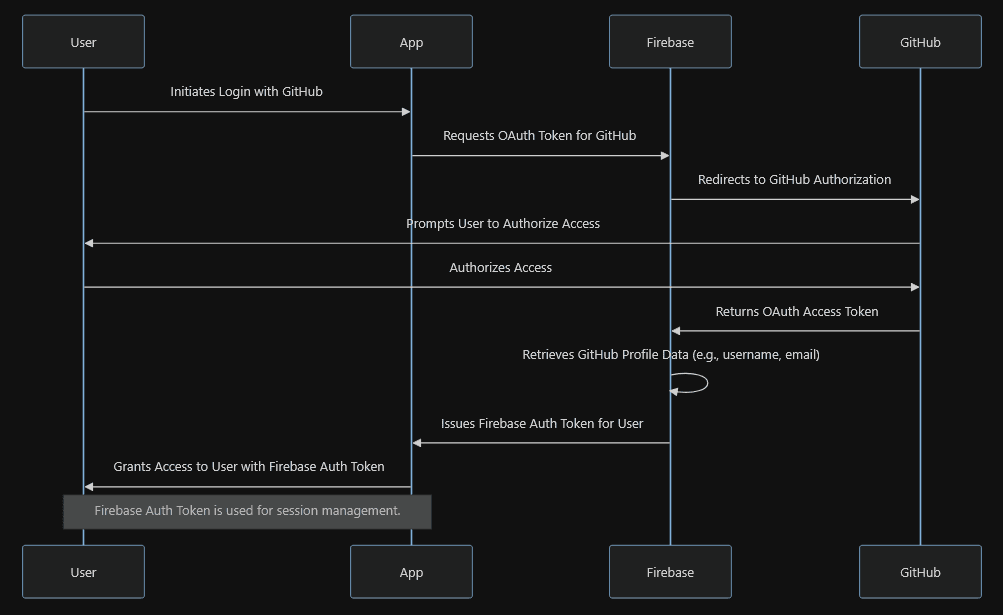
- OAuth: Open standard for access delegation, commonly used as a way for Internet users to grant websites or applications access to their information on other websites but without giving them the passwords
OAuth Sequence Diagram
Environment Variables
- A way to store sensitive configuration settings for an application
- Not hard-coded in the source code
- Not stored in the version control system (e.g. Git)
- Must be copied to deployment environment (Vercel)
- e.g. API keys, database connection strings, passwords
Environment Variables Example
.env.localfile in the root of the projectNEXT_PUBLIC_...prefix is required for client-side code
NEXT_PUBLIC_FIREBASE_API_KEY="AIzaSyDd7f7...";Coding Demo
- Following most of the steps from the assignment, implement a simple web application from scratch with authentication